The 4 Components
What Makes Up an AI Agent
Section titled “What Makes Up an AI Agent”Every AI agent, regardless of the platform it runs on, is built from four essential components. If any one of these is missing, you do not have a true agent. Understanding these four pieces will help you evaluate different platforms, troubleshoot problems, and build better agents.
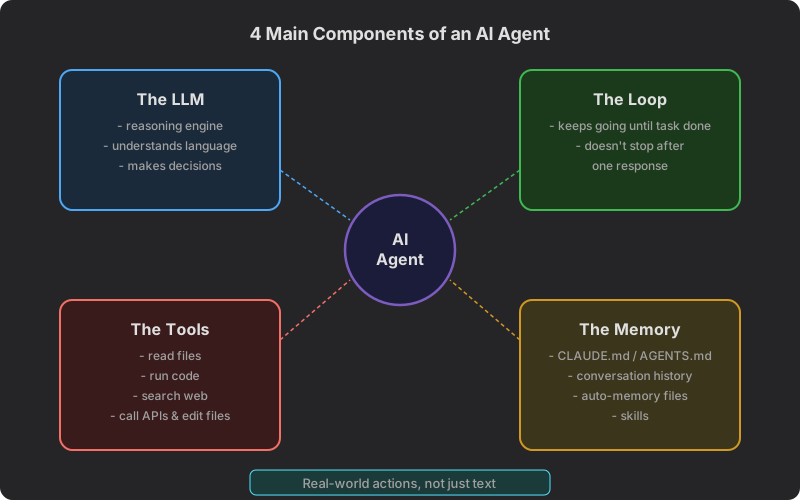
1. The LLM (The Brain)
Section titled “1. The LLM (The Brain)”The Large Language Model is the reasoning engine at the heart of every agent. It is the component that understands your instructions, makes decisions, and generates responses. Without the LLM, the agent would have no intelligence.
What the LLM does:
- Understands natural language. You write instructions in plain English (or other languages), and the LLM comprehends what you mean. You do not need to learn a programming language or special syntax.
- Reasons about problems. The LLM can break down a complex request into smaller steps, consider different approaches, and choose the best path forward.
- Generates content. It can write text, create structured data, draft emails, compose documents, and produce virtually any text-based output.
- Makes decisions. At each step of the agent loop, the LLM decides what to do next based on everything it knows so far.
Different LLMs have different strengths. Some are better at creative writing, others at analysis, and others at following detailed instructions. You will learn about these differences in the next lesson.
2. The Tools (The Hands)
Section titled “2. The Tools (The Hands)”Tools are the abilities that let an agent interact with the world beyond just generating text. A chatbot can only talk. An agent with tools can do things.
Common tools available to agents:
- File operations. Read existing files, create new files, edit documents, and organize folders. This lets agents work with your actual documents and data.
- Web search. Look up current information, find references, research topics, and verify facts. This keeps the agent from being limited to its training data.
- API calls. Interact with other software and services. This could mean checking the weather, looking up a stock price, or connecting to a business application.
- Code execution. Run calculations, process data, generate charts, or automate repetitive tasks. Even in a no-code course, the agent can write and run code for you behind the scenes.
- Image and media. Some agents can generate images, analyze photographs, process videos, or create visual content.
- Communication. Send emails, post to social media, create calendar events, or interact with messaging platforms.
The specific tools available depend on the platform you are using. Claude Code has access to your file system and can run terminal commands. ChatGPT has plugins and can browse the web. Gemini integrates with Google services. This is one of the main ways platforms differ from each other.
3. The Loop (The Work Ethic)
Section titled “3. The Loop (The Work Ethic)”The loop is what separates an agent from a chatbot. You learned about this in the previous lesson on the core agent loop, but it is worth emphasizing as a distinct component.
A chatbot works like this: You send a message, it responds once, and stops. If the response is not quite right, you have to send another message with corrections. You are managing the process.
An agent works like this: You describe a goal, and it keeps working through the Observe-Think-Act cycle until the goal is met. It might go through this cycle five times, twenty times, or more, depending on the complexity of the task.
Why the loop matters:
- Complex tasks become possible. Without a loop, you can only accomplish things that fit in a single response. With a loop, the agent can tackle multi-step projects that require research, drafting, revision, and formatting.
- Self-correction happens naturally. If the agent makes a mistake in one step, it observes the error in the next cycle and adjusts its approach. You do not need to catch every mistake yourself.
- Quality improves through iteration. The agent can draft something, review it, improve it, and refine it, all within a single request from you.
4. The Memory (The Notebook)
Section titled “4. The Memory (The Notebook)”Memory is what allows an agent to maintain context, learn your preferences, and improve over time. Without memory, every conversation starts from zero. With memory, the agent builds on previous interactions and accumulated knowledge.
Types of memory agents use:
- Conversation history. Everything said in the current session. The agent remembers what you asked, what it did, and what results it produced. This lets it refer back to earlier steps and maintain coherence.
- Configuration files. Files like CLAUDE.md (for Claude Code), custom instructions (for ChatGPT), or system prompts that tell the agent who it is, what it should do, and how it should behave. These persist between sessions.
- Auto-memory files. Some platforms automatically save notes about your preferences, your project, and patterns the agent has noticed. These files grow over time and make the agent more helpful with each interaction.
- Skills and workflows. Reusable procedures the agent has learned or been taught. Instead of figuring out how to do something from scratch every time, the agent can recall a proven approach.
Memory is what turns a one-time tool into a personalized assistant. An agent with good memory knows that you prefer bullet points over paragraphs, that your company uses a specific tone of voice, or that your project has particular requirements.
How the Four Components Work Together
Section titled “How the Four Components Work Together”The four components are not independent. They work as an interconnected system:
- You give the agent a goal. The LLM reads your instructions and the Memory to understand the context and your preferences.
- The LLM reasons about the first step. It considers what Tools are available and which one would be most useful right now.
- The agent uses a Tool to take action, such as searching the web or reading a file.
- The Loop cycles back. The LLM observes the result of the tool use, thinks about what to do next, and acts again.
- Memory accumulates. As the agent works, it builds up conversation history. When the task is complete, it may save useful information to long-term memory for future sessions.
This cycle continues until the agent has completed your request. The LLM makes the decisions, the Tools execute the actions, the Loop keeps the process going, and the Memory provides the context that makes everything smarter.
A Quick Self-Check
Section titled “A Quick Self-Check”Before moving on, make sure you can answer these questions:
- What is the role of the LLM in an agent? (It is the reasoning engine that understands instructions and makes decisions.)
- Why do agents need tools? (Without tools, they can only generate text. Tools let them interact with the real world.)
- What does the loop do that a single response cannot? (It allows multi-step tasks, self-correction, and iterative improvement.)
- Why is memory important? (It provides context, stores preferences, and lets the agent improve over time.)
If those make sense to you, you are ready to learn about the differences between the LLMs that power these agents.